
Secure your Piano account with an extra layer of protection. Multi-factor authentication (MFA) requires more than just a password to log in – keeping your data safer.
What is MFA?
MFA adds a verification step to your login process. Instead of just entering your password, you'll confirm your identity using a second method – like a code from your phone.
How to enable MFA
MFA is activated at the domain or subdomain level (it cannot be activated at the user level). You'll need to own the domain where you want MFA enabled.
To get started
-
Contact our Support team – MFA setup isn't available in the interface yet
-
Confirm you own the domain or subdomain
-
Choose whether to enable "remember this device for 30 days" (optional)
Supported authentication methods
Piano supports two authentication factors that work together:
-
One-time passwords (OTP) – Generated through an authenticator app like Google Authenticator
-
Recovery codes – Backup codes you can use if you lose access to your authenticator app
Both factors are activated together. You can't enable one without the other.
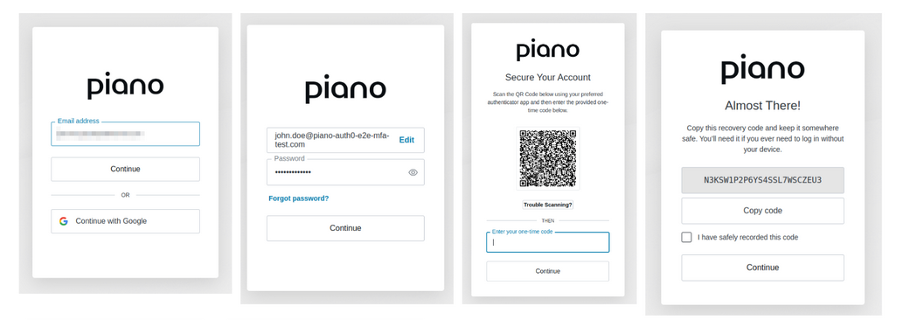
Setting up MFA for the first time
Once MFA is enabled for your domain, you'll be prompted to enroll the next time you log in.
-
Enter your email and password
-
Scan the QR code with your authenticator app
-
Enter the 6-digit code from your app
-
Save your recovery codes in a secure location
Logging in with MFA
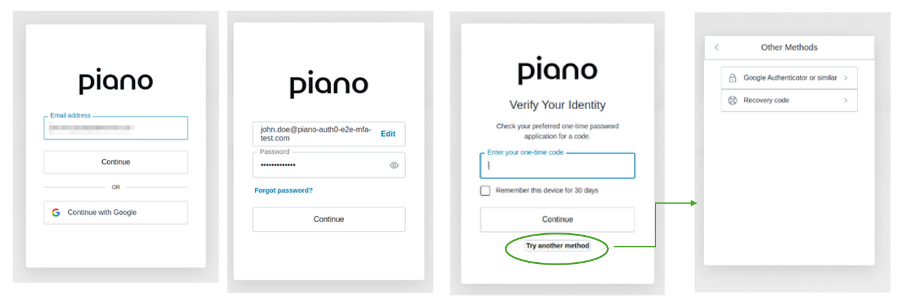
After enrollment, every login requires two steps:
-
Enter your email and password
-
Enter the 6-digit code from your authenticator app
If you selected "remember this device," you won't need to enter a code for 30 days on that device.
Resetting MFA
The standard recovery path when you lose access to your authenticator app is to enter one of the recovery codes you saved at enrollment. If you have also lost or never saved your recovery codes, you cannot reset MFA from the login page on your own. In particular:
-
"Forgot password?" does not reset MFA. A password reset re-issues your password, but the MFA enrollment remains tied to your account and you will still be prompted for a verification code after entering the new password.
To regain access:
-
Contact Piano Support with the email address of your account.
-
Support will verify your identity and reset MFA on your account.
-
The next time you log in, you will be prompted to enroll MFA again from scratch — re-scan the QR code with your authenticator app, and save the new recovery codes in a secure location (a password manager is recommended) so this situation doesn't recur.
Password requirements
Create a strong password with:
-
12 characters minimum (no maximum)
-
At least one lowercase letter (a-z)
-
At least one uppercase letter (A-Z)
-
At least one number (0-9)
-
At least one special character (!@#$%^&*)
Security note: Your account locks automatically after 10 failed login attempts from the same email and IP address combination.
Pricing
MFA is included at no additional cost.