
What “Exit rate (page)” means
The exit rate is the ratio of visits ending on a specific page compared to all page loads for that page. In practice:
-
A lower exit rate generally indicates users are more likely to continue to another page (higher click-through to subsequent content).
-
A higher exit rate indicates users more frequently end their visit on that page.
Currently, there are two ways to obtain the output rate of a specific page. One solution using Data Query and another one using Explorer.
Get exit rate in Data Query
It is possible to calculate it by selecting the Page property (with a filter on the desired page) and the Exit rate (page) metric.
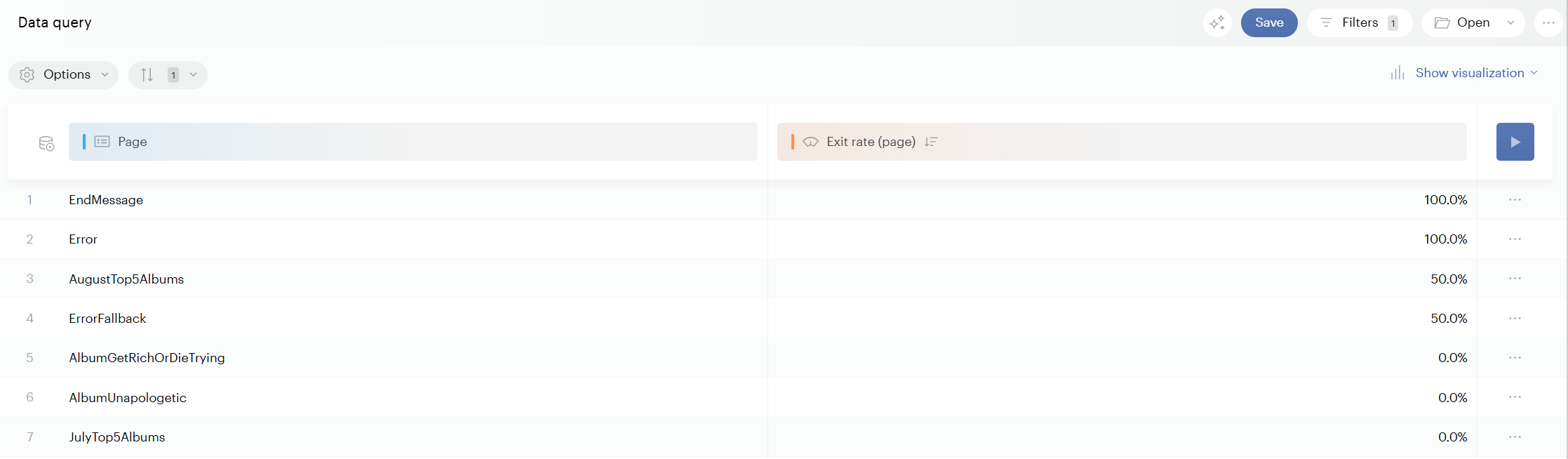
Although Funnels in Data Query can analyze a predefined sequence of steps (for example, a subscription flow), they are not suited for exploratory analysis across all pages. For page-by-page navigation and exit behavior, the Exit rate (page) metric and navigation analysis are the appropriate tools.
Get exit rate in Explorer (Navigation Exploration)
In Explorer, within the Navigation Exploration module, you can obtain a simplified view to quickly see the exit rate of a page:
-
Select a page from the drop-down menu.
-
Select the next page to display a sequence in the right-hand pane.
-
Look for the red percentage number on the right—this gives the overall exit rate after the selected page.
-
Hover over this number to see details.
In the hover bubble, you can find the percentage of exits from the site occurring on that page.