
This FAQ will provide you with some guidelines, but if you have a server-side implementation project, please reach out to the Support Team.
What is server-side?
Server-side tracking consists of collecting data generated by an Internet user when visiting a website, passing it first through a web server (or other type of server), and then transmitting it to the destination server. This way of data collection seeks to run the minimum of tasks possible in the browser.
Client-side relies on browsers and triggering tags, thus transmitting information directly from the browser of the user (web server) to the tracking server.
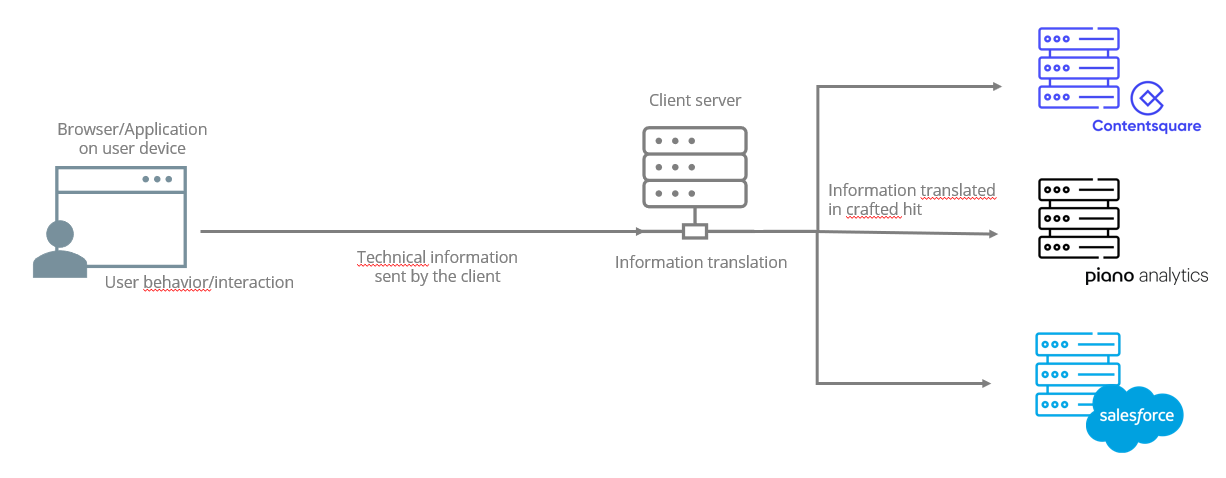
Why implement server-side tracking? Or not?
|
Pros 👍 |
Cons 👎 |
|---|---|
|
Improve the performance of the website: the triggered tags affect website performance and take longer time to load. |
You need to manage your own server. |
|
Better control of data security. |
More complicated to set up, you no longer benefit from default Piano SDK methods. |
|
A way to bypass adblockers (increase reliability and volume). |
You must rebuild your hits (crafted hit) using Collection API (tagless). |
|
Ability of enriching data during data collection. |
You need to set up methods to identify visitors and manage identification cookies. |
|
Improved ability to set cookies across most browsers when requests are routed through your own domain/server. |
No native information collected by default. |
|
|
Rebuild the privacy logic. |
Server-side implementation with Piano Analytics
It is possible to implement server-side tracking with Piano Analytics. The server-side data collection can be managed via a TMS as Tagcommander, GTM, TEALIUM or directly on your website.
We can differentiate multiple scenarios for server-side tracking. Some clients tend to use Piano SDK with server-side tracking; this practice is not recommended when the goal is to bypass adblockers, because SDK library is still loaded and transmits data by its own server before transferring data to Piano’s server (similar to the behavior of the CDDC). Tracking will still be blocked by adblockers because of the CDN library.
However, some hybrid approaches exist in the market (for example, collecting events in the browser and routing the request through your own server). If you mix client-side and server-side tracking, make sure events are not duplicated: if the same user action triggers both a client-side hit and a server-side hit, reporting will be inflated. Routing (redirecting) a single hit through your own server is different from firing two separate hits—avoid implementing both for the same action unless you have a clear deduplication strategy.
Common server-side routing patterns (overview)
Depending on your infrastructure and constraints, server-side tracking is commonly implemented by routing requests through your own domain/server before forwarding them to Piano. Approaches include:
-
Reverse proxy / CDN-based routing (often the most effective for reliability): requests are routed through your own infrastructure, which can help with cookie setting and reduce blocking because requests appear first-party to the browser.
-
CNAME / domain delegation: similar goal (first-party appearance), but can be more limited depending on the setup and governance constraints.
The exact setup depends on your infrastructure. If you use Commanders Act/Tag Commander server-side features, consult Commanders Act for detailed integration guidance specific to their server-side product.
Server-side implementation steps
Here are the steps to follow to implement server-side tracking:
-
Configure an internal collection server.
-
Collect data with your own methods.
-
Send collected data to your server.
-
Implement tracking with Collection API.
-
Transfer data to our server.
Server-side tracking logic
In order to bypass adblockers, it is important to send data in raw format to the client’s server; data must not take the format of Analytics events. You will then have to translate it into a language that our server can understand using POST HTTPS requests from our Collection API.
When you perform a server-side implementation, you won’t be able to check the hits on the browser (network tab of the tool inspect). You will have to go through our tool Stream Inspector.
Server-side and privacy
The implementation of server-side does not change the precautions to be taken to comply with GDPR and CNIL restrictions. Whether information is transmitted from a browser or a server, user’s consent must be obtained.
The obligations of site publishers remain the same, namely:
-
Inform the user explicitly of data collection
-
Obtain explicit consent
-
Propose an opt-out
It should be noted that since our methods are no longer valid for this server-side context, you will have to rebuild the privacy logic and configure his own methods in order to send a given property in a specific mode (handle the strictly necessary for exempt mode for example).
GDPR prohibits the transfer of data outside Europe without consent. For customers wishing to benefit from the exemption under server-side tracking with a server outside Europe, they must check the feasibility of the implementation.
Server-side and source
You must push the previous URL of the first access in order to benefit from source analysis. For marketing sources, tracking remains the same. You need to track campaigns with at_ or utm_ parameters.