
Tag Version
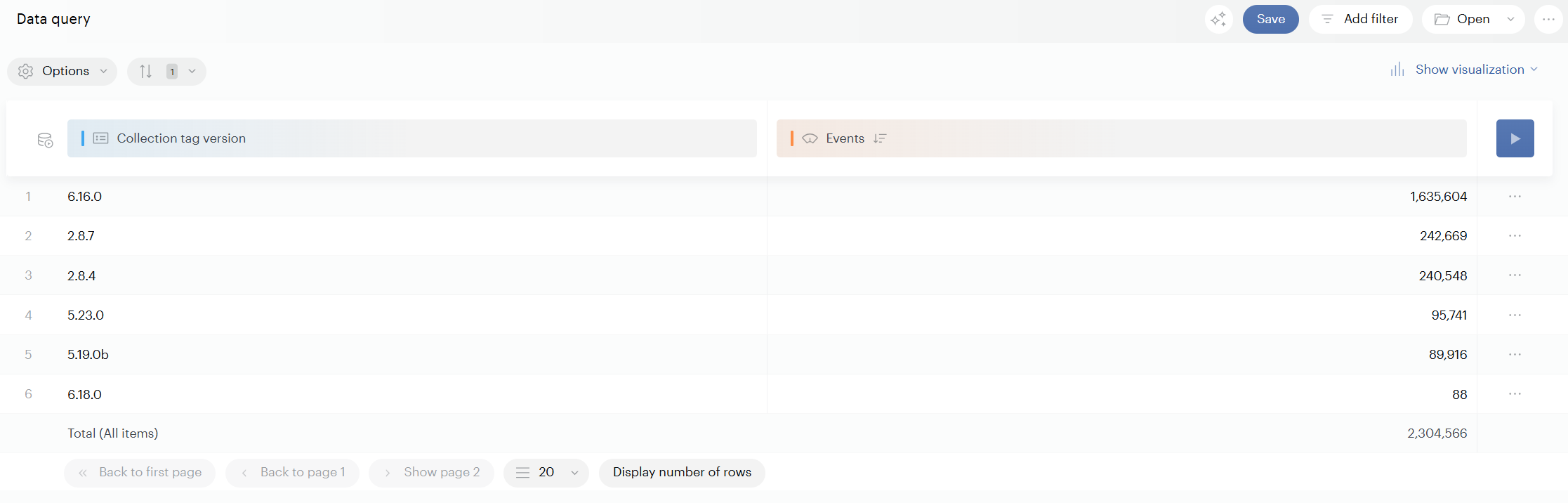
Yes, it is possible to find out the version of the tag currently used by using the Collection tag version property. It is a native property that is automatically populated with data.
You can view this property in your analyses (for example, in Data Query) to identify which collection tag version sent each event.
If you collect data with the Smarttag library and with the Piano SDK, the property is also able to trace both versions.
This information can also be found in the Tag Inspector extension.
Why you might see multiple tag versions
It’s normal to see multiple values for Collection tag version over time or across users. One common reason is browser caching: a user’s browser can keep using a previously cached version of the library from an earlier visit, even after you deploy a newer version.
Check the tag version on your website (real-time)
You can verify the version being used on a page by inspecting the network request:
-
Open your browser Developer Tools (
F12). -
Go to the Network tab.
-
Trigger a page view or event so a Piano Analytics collection request appears.
-
Select the request and review the Payload (or request parameters) to find the tag version information being sent.
This is useful for validating what is running right now on a specific page and browser, independent of what you see aggregated in reporting.
Version of the library
You can find out which library you are using simply by looking at the version number displayed. When the number is equal to or greater than 6.0, you use the Piano Analytics SDK.