
The click.campaign.offsite event allows you to see how many clicks have been counted on your various marketing campaigns.
click.campaign.offsite is an event that is automatically generated by Piano Analytics processing when the following condition is met: presence of the src_campaign property on a page.display event. Implicitly, the presence of a campaign on a page load indicates that a link has been clicked to lead to the site (even if that page is not the entry page of the visit).
This event is assigned a Visitor ID to allow you to do visitor segmentation on it, but not a Visit ID. This event should therefore be analyzed on its own, to see which campaigns contributed to access your site.
In the following example, the visitor arrived on the site via Direct Access on page A. A few minutes later, they clicked on a Sponsored Link that took them to page B. A click.campaign.offsite event was generated at the same time as page B was loaded.
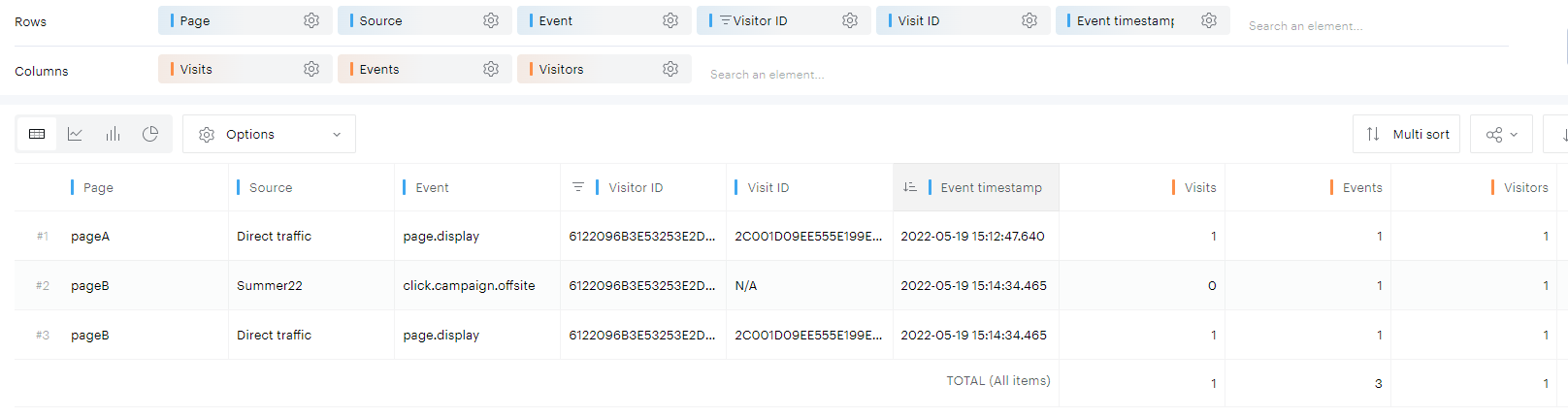
Why click.campaign.offsite has no Visit ID
A visit in Piano Analytics can only have one traffic source, and that source is determined at the start of the visit (by the first event of the visit, typically the first page.display). If campaign parameters are encountered later during the same visit, Piano Analytics records them as click.campaign.offsite events without changing the visit source.
As a result:
-
click.campaign.offsiteincrements Events and can increment Visitors -
click.campaign.offsitedoes not increment Visits and does not carry visit-scoped properties (because there is no Visit ID)
This design makes it possible to track marketing touchpoints that occur during a visit while preserving correct visit source attribution.
Relationship to page.display (timestamps)
click.campaign.offsite is created during processing from a page.display event that contains campaign information. In practice, the two events:
-
typically share the same timestamp (they originate from the same page load)
-
occur together when a tracked landing URL is loaded
If you see click.campaign.offsite events without a corresponding page.display in the same timeframe, it may indicate a collection or analysis issue worth investigating.
When you can see multiple click.campaign.offsite events
It is normal to see multiple click.campaign.offsite events for the same visitor, including within a single visit. As long as the visit remains active (by default, less than 30 minutes of inactivity), each time a page loads with campaign parameters, a new click.campaign.offsite event can be generated.
This commonly happens when a visitor:
-
arrives via one source (for example, Direct)
-
later clicks one or more tracked marketing links and returns to your site within the same visit window
How to analyze click.campaign.offsite correctly
Because click.campaign.offsite has no Visit ID, analyze it independently from visit-based reporting:
-
Use Events to count total campaign clicks recorded by this mechanism.
-
Use Visitors to count unique visitors who generated at least one
click.campaign.offsite.
If your analysis focuses on visits (entry pages, bounce rate, time spent, etc.), exclude offsite events. A common approach is to filter using the Visit metric (for example, keep rows where Visits > 0) or explicitly exclude the click.campaign.offsite event type.
Why some properties show N/A
Visit-scoped properties such as Entry page (and similar “entry” or “visit” fields) can show N/A for click.campaign.offsite. This is expected: those properties require a Visit ID, and click.campaign.offsite is not linked to a visit.
Common questions and troubleshooting
“Why do I have more visitors than visits for a campaign?”
This is typically caused by click.campaign.offsite being included in the analysis. These events count visitors but not visits, so mixing them into visit-based reporting can create apparent discrepancies.
“Should click.campaign.offsite counts match page.display counts?”
Often, each tracked page load produces both a page.display and a click.campaign.offsite, so counts can look similar. Differences can occur, for example, if some page.display events are excluded during processing (such as filtering identified bot traffic) while the derived offsite click event remains present. In that case, discrepancies are expected.
“Can I disable click.campaign.offsite?”
No. This event is part of how Piano Analytics processes and exposes campaign interactions and attribution. If you do not want to see it in certain reports, exclude it in your analyses (or configure views that hide it).