
For Piano Analytics to classify cross-site traffic between your organization's properties as Portal sites (instead of treating each cross-site visit as an external Referrer site), each site needs to be set up correctly. This article covers the configuration — which settings drive the recognition, where to find them, and how to verify the result.
For the conceptual distinction between Portal sites and Referrer sites, see What's the difference between "Portal sites" and "Referrer sites"?. This article assumes you already understand that distinction and focuses on how to configure it.
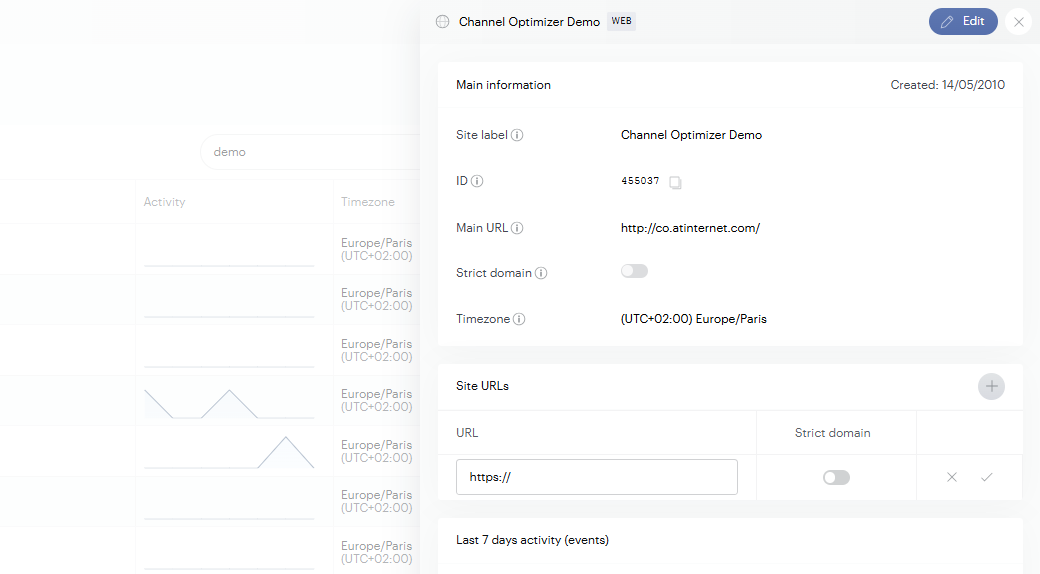
The Main URL
The Main URL is the canonical URL Piano Analytics associates with each site. It's set per site in your site configuration and is what other sites in your organization compare incoming referrers against.
When a visitor lands on Site A with a referrer URL that matches the Main URL of Site B (and Site B is registered in the same Piano Analytics organization as Site A), the visit on Site A is classified as Portal sites with Site B as the originating portal.
To set or update the Main URL:
-
Open your site configuration in the Piano Analytics interface (Data Collection Portal > Dashboard > look for your site.)
-
Set the Main URL to the canonical address of the site (typically
https://www.example.com). -
Save.
If you've recently migrated to a new domain, update the Main URL before retiring the old domain — otherwise cross-site visits from other organization sites will fall back to Referrer sites classification until the change propagates.
Complementary URLs
A site is often reachable at more than one URL — a CDN-fronted version and an origin version, HTTP and HTTPS variants during a migration, marketing-friendly short domains, regional aliases. Each of these alternate URLs needs to be added to the Site URLs list so:
-
Other sites in the organization recognize traffic from any variant as Portal sites traffic.
-
The site itself doesn't generate self-referral entries when visitors move between its own variants.
To add complementary URLs:
-
Open the site's configuration.
-
In the Site URLs section, add each alternate URL under which the site is reachable.
-
Save.
A site with www.example.com as its Main URL and no complementary URLs configured will not recognize traffic from m.example.com as the same site — those visits will produce self-referral events. Adding m.example.com as a complementary URL fixes this.
Strict Domain
Controls whether subdomains of the Main URL count as same-site.
|
Strict Domain |
Behavior |
|---|---|
|
Off (default) |
Subdomains of the Main URL are treated as same-site automatically. |
|
On |
Only the exact Main URL is same-site. Subdomains are external — classified as Portal sites (if registered separately in the organization) or Referrer sites (if not). |
Leave it off for variants of the same product (www. / m. / mobile.).
Turn it on when a subdomain is a genuinely separate property (developer portal, careers site) that should be measured on its own.
If Strict Domain is on but you still want certain alternates treated as same-site, add them via Complementary URLs.
Multi-domain and international organization setups
For organizations running country-specific or language-specific domains (example.com, example.fr, example.de), our recommendation would be:
-
Each domain is its own Piano Analytics site with its own Site ID and its own Main URL.
-
All sites are registered in the same Piano Analytics organization. This is the prerequisite for Portal sites recognition between them.
-
Each site's Main URL points at its own canonical domain (
example.fr,example.de, etc.). The sites recognize each other's Main URLs and classify cross-site traffic accordingly.
Once configured, a visitor moving from example.fr to example.com appears under Portal sites in example.com's reports with example.fr as the originating portal. The traffic doesn't pollute the Referrer sites bucket, and you can measure cross-edition flow directly.
If you'd rather analyze the international footprint as a single audience instead of as separate sites, group the sites into a Site Group in Piano Analytics. The Site Group aggregates the underlying sites' data into a unified view while preserving each individual site's reporting.